Order Settings
Turn automatic fulfillment of digital items on or off, understand how orders are processed, and manually sync orders that were missed.
The Order Settings page controls what happens in Shopify after a sale, and it is your safety net.
Under normal circumstances, you will rarely need to visit this page. Imprint is designed to automatically detect new orders from Shopify instantly. However, in the rare event of a network glitch or a Shopify outage, this page allows you to force a manual update to ensure no customer is left behind.
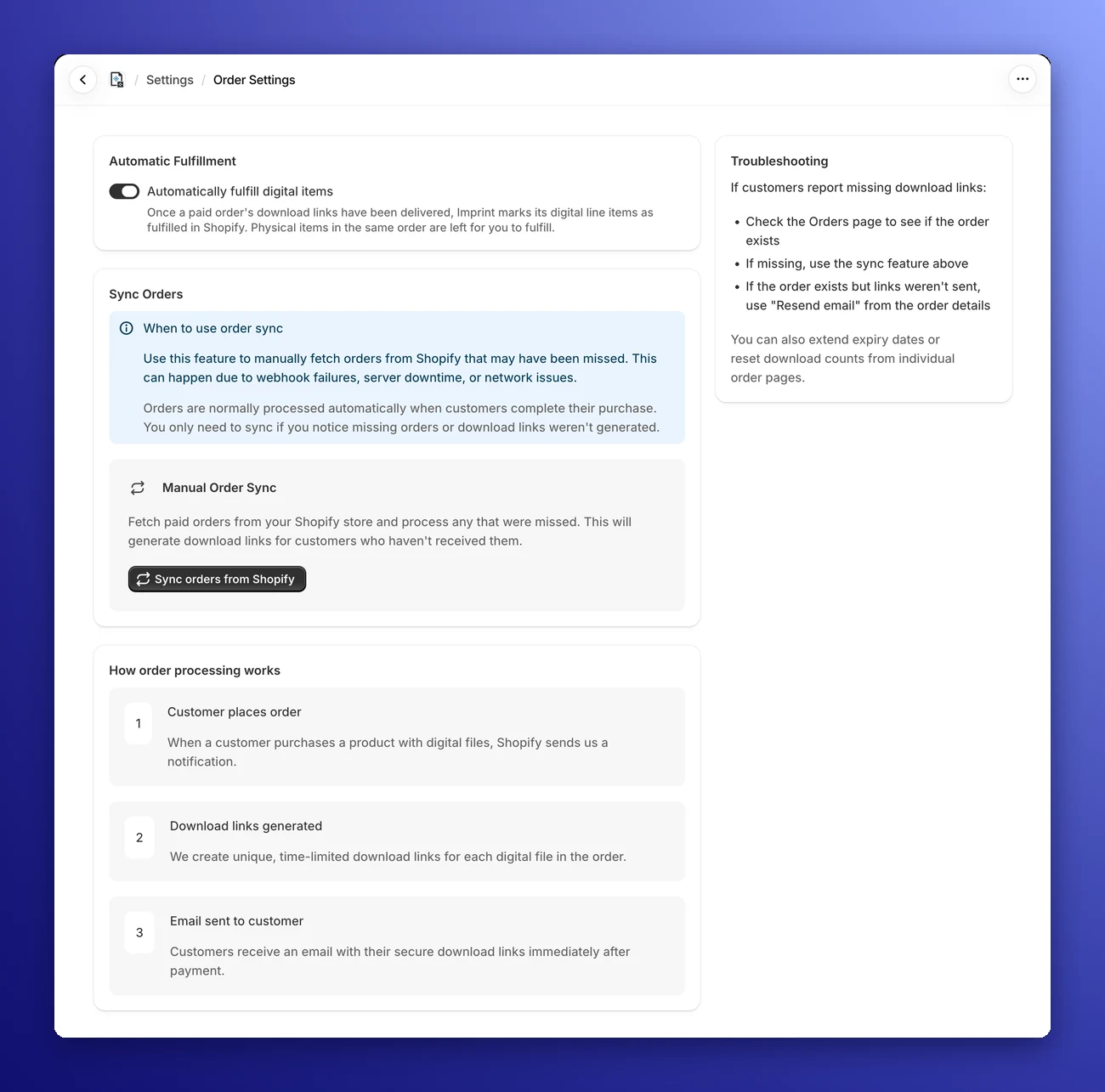
📦 Automatic Fulfillment
Digital items don't need shipping, so there's no reason for them to sit in your Unfulfilled list. With Automatically fulfill digital items switched on (the default), Imprint marks the digital line items of each paid order as fulfilled in Shopify, right after their download links have been delivered.
- Physical items stay with you: In an order that mixes digital and physical products, only the digital items are fulfilled. Physical items, including physical variants of a digital product, are left for you to fulfill.
- No extra customer email: Shopify doesn't send the customer a shipping notification for these fulfillments.
- Only new, automatic orders: Imprint fulfills orders that reach it automatically when they are paid. Orders brought in with Sync orders from Shopify, and orders you resend or retry, are never fulfilled automatically.
- Orders on hold: If an order is on hold in Shopify (for example, while a post-purchase offer is shown), Imprint fulfills it once the hold is released.
- Timing: It usually happens within seconds. Sometimes Shopify needs a few minutes to get an order ready, and Imprint waits for it.
Switch it off if you prefer to fulfill digital items yourself, then click Save.
"Imprint needs permission to fulfill orders"? This banner appears when Shopify refused an automatic fulfillment because Imprint is missing the fulfillment permissions. Reopen the app from your Shopify admin and approve the updated permissions to switch automatic fulfillment back on.
🔄 Manual Order Sync
This tool allows you to manually fetch recent orders from Shopify and process any that might have been missed.
When should you use this?
You should use the Sync orders from Shopify button if:
- A customer complains they haven't received their email, and the order isn't showing up in your Imprint Orders list.
- You suspect a Shopify outage, server downtime or a network problem kept Shopify from telling Imprint about a sale.
What happens when you click it?
When you click the black Sync orders from Shopify button, a window opens where you choose:
- Sync orders since: Orders created after this date are synced. It starts at one week ago.
- Maximum orders to sync: 25, 50 (the default), 100 or 250 orders at most.
Click Sync orders to start. Then:
- Imprint scans your store for "Paid" orders in that period.
- It identifies any orders with digital products that do not exist in Imprint yet.
- It automatically generates the download links and sends the delivery emails to those customers (when download emails are switched on).
The sync runs in the background, so give it a moment before checking the Orders page.
Note: This action is safe to run multiple times. If an order has already been processed, Imprint will simply skip it.
⚙️ How Order Processing Works
To help you understand what happens "behind the scenes," the page outlines the three steps of our automated flow:
- Customer places order: When a customer buys a product containing digital files, Shopify notifies Imprint.
- Download links generated: We instantly create unique, time-limited download links for every file in that order.
- Email sent to customer: Finally, we dispatch the branded email with the access links immediately after the payment is confirmed.
With Automatic Fulfillment on, the digital items are then marked as fulfilled in Shopify.
🔧 Troubleshooting Tips
If a customer reports missing download links, follow this simple checklist provided in the sidebar:
- Check the Orders Page: First, look at the main Orders list to see if the order exists.
- Run a Sync: If the order is missing entirely, use the Sync orders from Shopify button described above.
- Resend Email: If the order does exist but the customer claims they didn't get the email, go to the order details and click Resend Email.
If the order shows as Failed, open it: the page explains what went wrong (for example, your own email server refused the email) and has a Retry button. You can also extend expiry dates or reset download counts from individual order pages.