Managing Orders
How to track deliveries, troubleshoot customer download issues, trace copies back to their order, and manage access permissions.
🧾 Order Options
The Orders page is your central hub for tracking who has purchased your files and more importantly, whether they have successfully downloaded them.
Imprint syncs with Shopify automatically. When a customer buys a product, the order appears here instantly. It shows as Pending for a moment while Imprint sends the download links, then as Processed and Paid.
🔍 The Orders List
At a glance, this list tells you the story of every sale. You don't need to click into an order to see if a customer is happy.
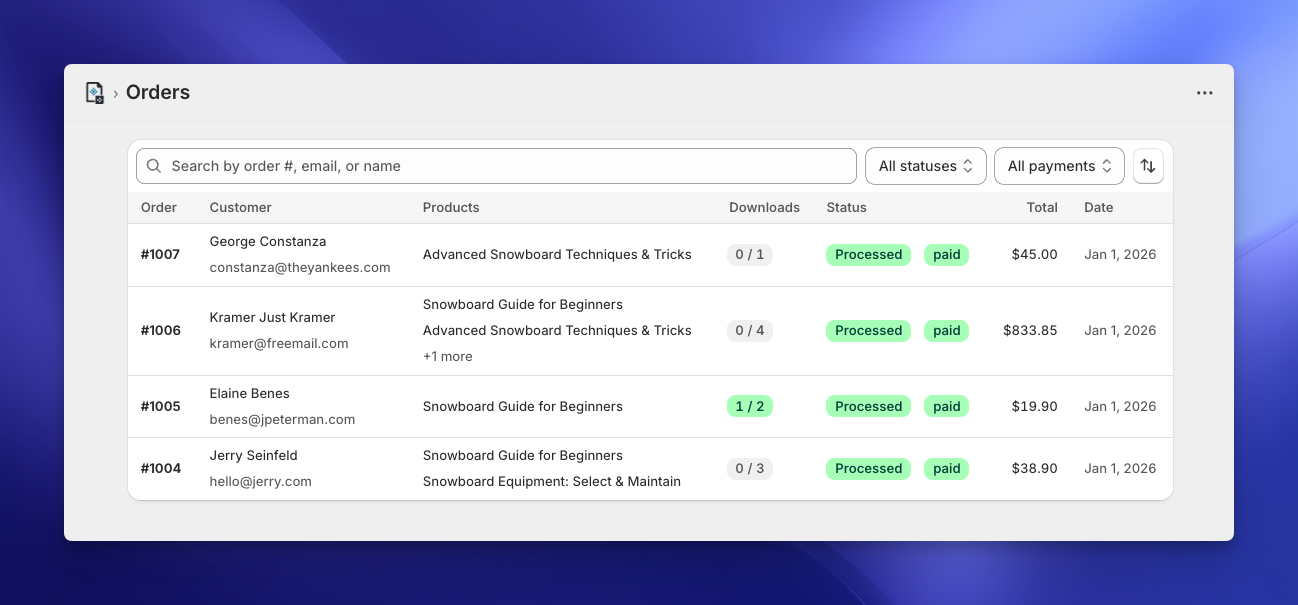
- Search & Filter: Quickly find a specific transaction by typing the Order #, Customer Email, or Name in the search bar. Use the Status filter (Processed, Pending, Failed) and the Payment filter (Paid, Pending, Refunded, Partially refunded) to narrow the list, and the sort button to order it by Date, Order number, Total or Customer.
- Downloads Column: This is your "Is everything okay?" indicator. It shows how many downloads the customer has made, next to the number of files in the order (e.g.,
1 / 2means 1 download so far, for an order with 2 files). The first number counts every download, so it can go higher than the second. - Status Column: Shows whether the links were delivered (Processed, Pending or Failed), the payment status, and Restricted if you've blocked the order's downloads.
🔑 Find Order by Code
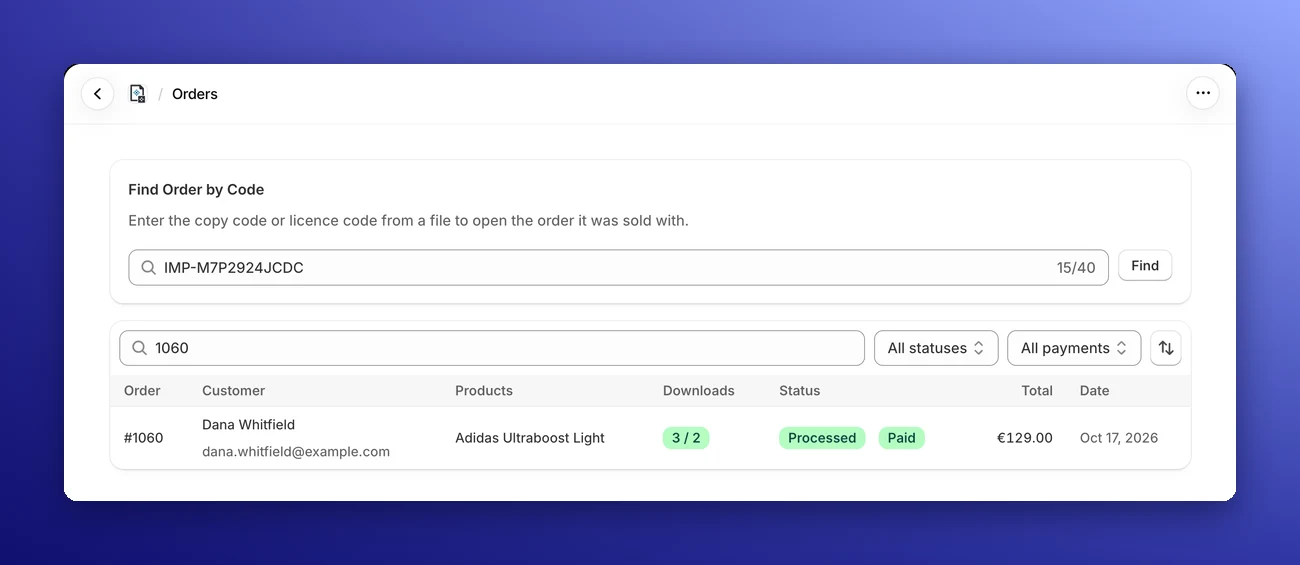
Found one of your files somewhere it shouldn't be? Every download gets a copy code (like IMP-7K3QZ9M2PXP) and every order a licence code (like H4R8TW2N). If your watermark or tracing marks put them in the file, they lead you back to the order.
Type or paste either code into the Find Order by Code box above the orders list and click Find. Imprint opens the order it belongs to. Don't worry about upper or lower case, spaces or mixing up look-alike characters such as O and 0: Imprint handles them, and it tells you when a copy code has a typo instead of opening the wrong order.
Learn more about copy tracking
🛠️ Order Details & Actions
Clicking on any order (like Order #1004) opens the detailed view.
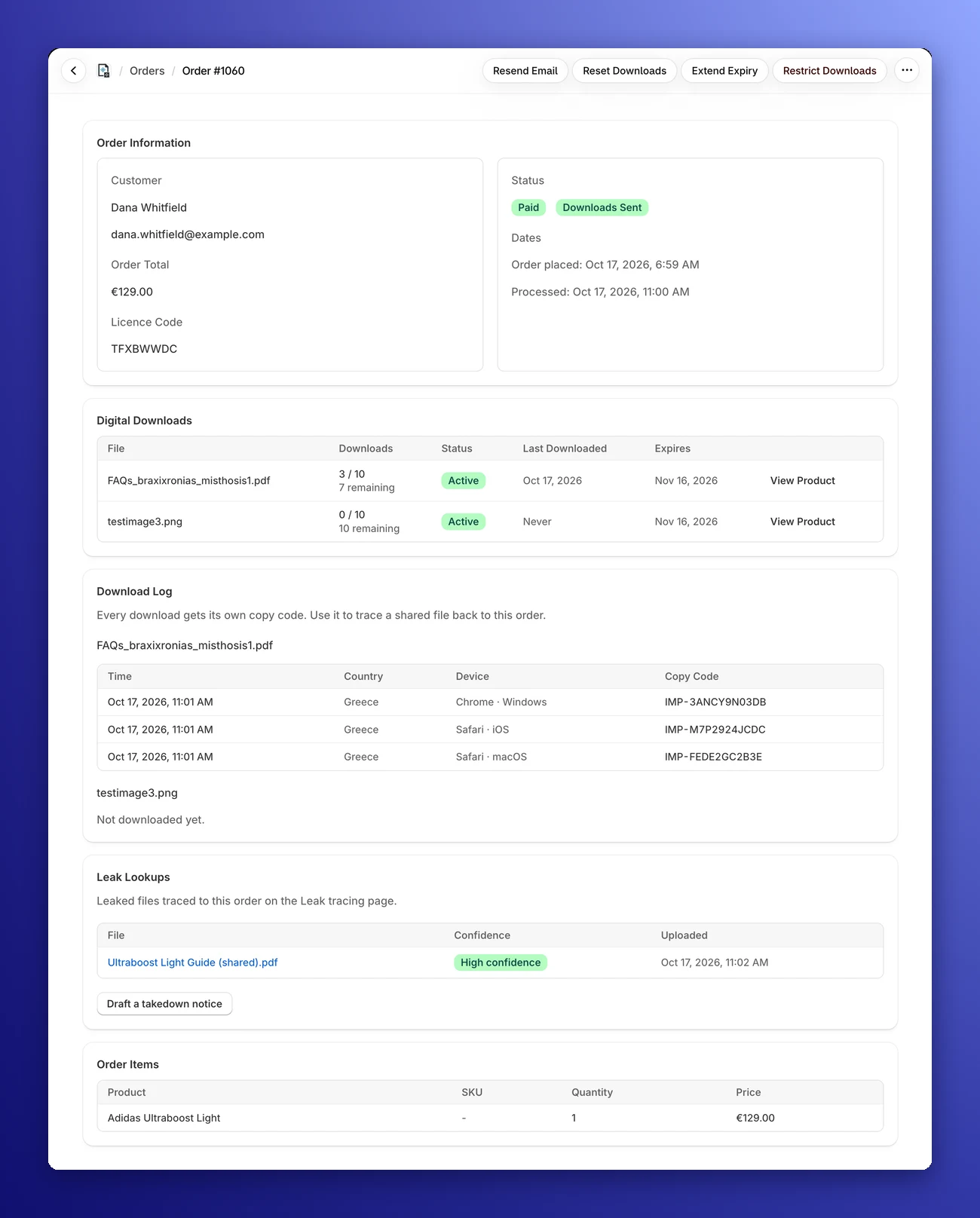
The Order Information box shows the customer, the order total, the order's status and dates. On the Basic plan or higher, it also shows the order's Licence Code: one code for the whole order, the same on every file in it.
Under Digital Downloads, every file in the order is listed with its downloads used and remaining, whether the link is Active, Expired or has hit its Limit Reached, when it was last downloaded, and when it expires.
At the top right, you will find four powerful buttons to handle common scenarios:
1. Resend Email ✉️
- Use when: A customer says, "I never received my download link!"
- What it does: Immediately triggers a fresh email with the download links to the customer's inbox. The customer gets the same links as before, and their download counts are not reset.
- Good to know: The button is unavailable for a moment while a new order is still being processed. If Send download emails to customers is switched off in your Email Settings, no email is sent.
2. Reset Downloads 🔄
- Use when: A customer says, "My computer crashed while downloading and now I reached my limit!"
- What it does: Resets the download count of every file in the order to zero, giving the customer a fresh start to retrieve their files.
3. Extend Expiry ⏳
- Use when: A customer emails you a week later saying, "I forgot to download my files and the link expired."
- What it does: Click Extend by 7 Days to make every download link in the order valid for another 7 days from today, reactivating expired links. A link that had more than 7 days left is also set to 7 days from today.
4. Restrict Downloads 🚫
- Use when: You suspect a customer is sharing their download link.
- What it does: Immediately revokes access. Even if the customer has the email, the links will stop working. You can add an optional message that the customer sees when they try to download.
- Changed your mind? Click Remove Restriction to give the customer their access back.
⚠️ Failed Orders
Sometimes the download email can't be delivered, for example when your own email server (custom SMTP) refuses to send it. The order is then marked Failed, and its page shows a Downloads could not be delivered banner with the error message.
- Fix the cause. If it's an email problem, the Email Settings button in the banner takes you straight to your Email Settings, where you can send yourself a test email.
- Click Retry in the banner. Imprint processes the order again and sends the download email.
You can also use Resend Email on a failed order. While an order is pending, its page updates by itself, so you'll see the result without reloading.
📜 Download Log
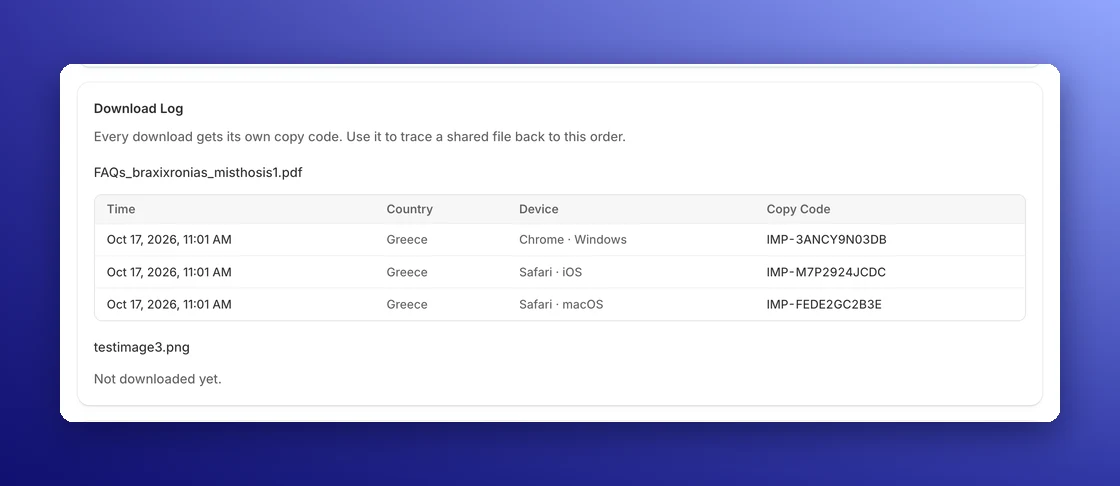
The Download Log on the order page lists every download of every file: when it happened, the country, the device (browser and operating system), and the Copy Code that download got. It shows the 50 most recent downloads per file.
Each copy code points to one single download, so if a copy of your file turns up online, the code in it tells you exactly which download it was. Downloads made before the Download Log was added aren't listed. After 24 months, the country and device are removed from a download, but its copy code stays.
Learn more about copy tracking
🕵️ Leak Lookups
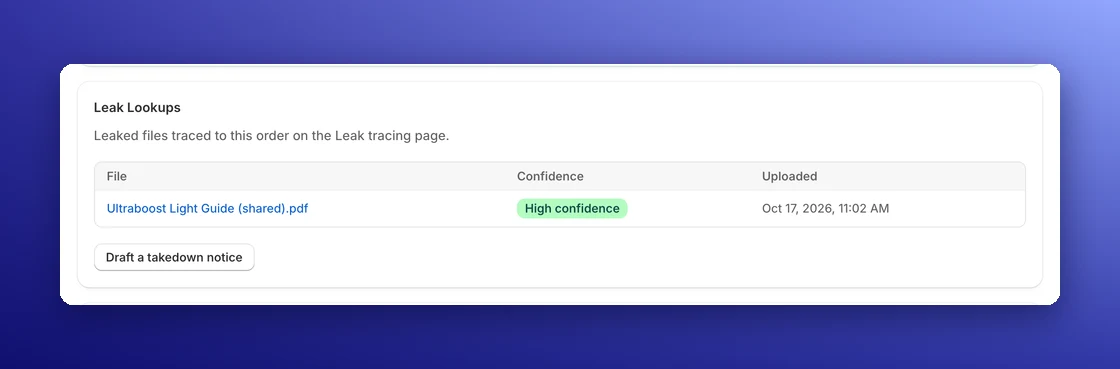
When you trace a leaked file on the Leak tracing page and it matches an order, the lookup also appears in the order's Leak Lookups section, with the file name, the Confidence of the match and the date you uploaded it. Click a file to open the full result.
From here, you can click Draft a takedown notice to ask a website to remove the copies. See Takedown Notices.
📦 Automatic Fulfillment
Once a paid order's download links have been delivered, Imprint marks its digital items as fulfilled in Shopify for you. Physical items in the same order are left for you to fulfill. You can turn this off under Settings → Orders. See Order Settings.
💸 Handling Refunds & Cancellations
You don't need to worry about manually restricting access when you issue a refund. Imprint listens to your Shopify store in real-time.
When you process a refund inside your Shopify Admin, Imprint automatically syncs the status and adjusts access permissions instantly:
- Full Refunds: If you refund the entire order, all download links associated with that order are immediately invalidated. The customer will no longer be able to download any files.
- Partial Refunds: If you only refund specific items (e.g., removing just the "Video Add-on" from a bundle), Imprint is smart enough to only revoke access to the refunded files. The customer keeps access to the products they still paid for.
- Cancelled Orders: If you cancel an order in Shopify, Imprint restricts all of its downloads automatically.